
Create a new dataset to start processing imagery, and create maps and digital twins of the reality or upload outputs to PIX4Dcloud.
Access: To select the project template, navigate to step 4 of the project wizard.
Licenses: This article is valid for PIX4Dcloud Starter and PIX4Dcloud Pro licenses (formerly PIX4Dcloud Advanced).
Roles: Only Owners, Managers, and Editors can create and process datasets in PIX4Dcloud.
| 1.Dataset creation > | 2. Image selection > | 3.Output coordinate system > | 4.Processing options > | 5. GCPs automation |
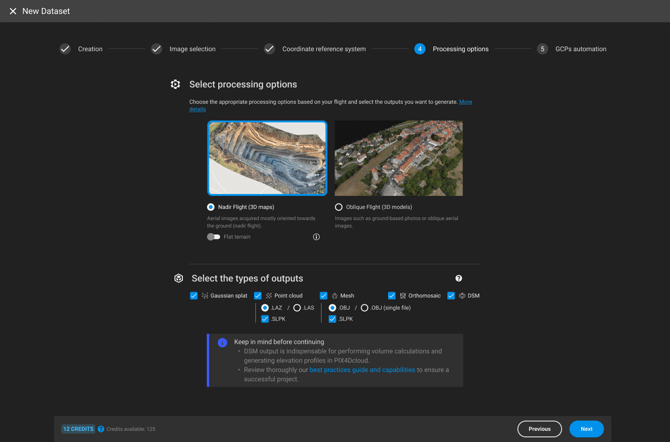
This step allows the user to select a processing template for the project. Different processing templates are available:
- Nadir Flight (3D maps): It is ideal for aerial RGB images acquired using a grid flight plan with high overlap, mostly oriented towards the ground. Typical applications are quarries, cadasters, etc.
- Oblique Flight (3D models): Ideal for any RGB images with a high amount of overlap, such as oblique aerial images (free flight). Application examples are 3D models of buildings, objects, inspection, etc.
Once the processing template has been selected:
- Select the types of outputs: Choose one or more outputs (point cloud, Gaussian splat, mesh OBJ (single file) or scalable mesh (multiple OBJ files), orthomosaic, or DSM) to be generated during the project processing. By default, all outputs are selected.
- (For PIX4Dcloud users) Select Create to finalize the dataset creation. The upload of the inputs starts.
(For PIX4Dcloud Pro and above licenses) Select Next and follow the instructions for step 5. GCPs automation.
Warning: Note that PIX4Dcloud Pro is required to generate Gaussian splat (.ply), SLPK point cloud and SLPK 3D textured mesh outputs. The following article explains how to upgrade your PIX4Dcloud Starter license to PIX4Dcloud Pro.