
|
|
|
|
|
|
|


IN THIS ARTICLE
What is Gaussian splatting?
Minimum recommended hardware
Gaussian splatting in PIX4Dmatic
Licenses
Supported datasets
Results
Recommended processing steps
Best practices for data acquisition
What is Gaussian splatting?
Gaussian splatting is a novel technique for 3D scene reconstruction and rendering that represents a scene as a collection of 3D Gaussians rather than traditional meshes or point clouds. It allows for highly detailed 3D models with photorealistic rendering.
Minimum recommended hardware
The minimum recommended hardware for generating Gaussian splatting in PIX4Dmatic is the following:
- OS: Windows; macOS is not supported.
- NVIDIA graphics card
- GPU with at least 10 GB of VRAM (can work with less)
For more information: Recommended hardware - PIX4Dmatic
If the computer does not achieve the minimum recommended hardware, the Gaussian splatting processing option will be greyed out. Alternatively, a project can be uploaded to PIX4Dcloud for processing to get Gaussian splatting.
For more information: Process in PIX4Dcloud - PIX4Dmatic
Info: macOS cannot generate Gaussian splatting, but it can open OPF projects that contain Gaussian splats and display them.
Gaussian splatting in PIX4Dmatic
Licenses
Gaussian splatting is only available with a PIX4Dmatic Pro license.
Supported datasets
Gaussian splatting models can be generated for projects captured with both aerial and terrestrial image datasets. This includes imagery acquired by drones (nadir and oblique flights) as well as ground-based capture, such as those collected with PIX4Dcatch. As long as the images have sufficient overlap, coverage, and consistent exposure, PIX4Dmatic can reconstruct the scene as a set of 3D Gaussians and produce a detailed, photorealistic Gaussian splatting representation from either aerial, terrestrial, or combined datasets.
Depending on the dataset, the appropriate template should be selected:
-
Nadir. Template optimized for aerial datasets captured with nadir drone imagery.
-
Oblique. Template optimized for aerial datasets captured with oblique drone imagery.
-
PIX4Dcatch. Template optimized for projects captured with PIX4Dcatch. It is highly recommended to enable the sky filter option to improve the quality of the results.
-
Mixed. Template intended for mixed datasets that combine aerial imagery and PIX4Dcatch acquisitions.
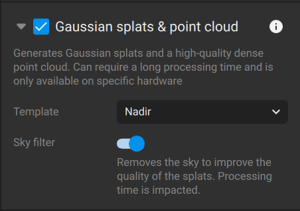
Note: Fisheye cameras, 360º and thermal images are not supported for Gaussian splatting generation.
Results
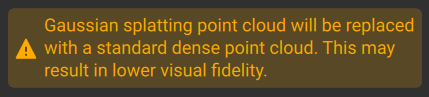
Once the processing step is completed, PIX4Dmatic outputs both a Gaussian splatting model and a dense point cloud in a single run. The Gaussian splatting model provides a photorealistic 3D representation optimized for interactive visualization, while the dense point cloud contains discrete 3D points that can be used as input for subsequent processing steps such as mesh generation, digital surface model (DSM) creation, and orthomosaic.
Note: There is no need to run the dense point cloud processing step after Gaussian splatting, as a point cloud is already created during this process. If the dense point cloud step is executed, it will overwrite the point cloud generated as part of the Gaussian splatting workflow.
Recommended processing steps
The workflow for generating Gaussian splats differs slightly from the standard photogrammetry workflow. In a typical photogrammetry project, the pipeline progresses from image calibration and camera optimization to the generation of a dense point cloud, which is then used as the basis for meshes, digital surface models, and orthomosaics.
With Gaussian splatting, PIX4Dmatic can derive a photorealistic 3D representation directly from the calibrated images. When Gaussian splatting is generated immediately after camera calibration, the dense point cloud resulting of this processing step will be the input for the next processing steps: mesh, digital surface model, and orthomosaic. The dense point cloud processing step of the standard photogrammetry workflow is no longer required and can be skipped.
Best practices for data acquisition
Gaussian splatting is a 3D reconstruction technique based on images; high-quality results depend directly on how the images are captured. For optimal accuracy reconstruction, the area of interest should be covered from multiple viewpoints, ensuring it is visible in several overlapping images.
As with any photogrammetry project, longitudinal and transverse overlap must be maintained for a good reconstruction. For Gaussian splatting, this is especially important to ensure stable camera calibration and a consistent 3D representation. As a general guideline, aim for at least 70–80% longitudinal overlap along the flight lines and 60–70% transverse overlap between adjacent lines for aerial surveys. Sufficient overlap improves tie point extraction, reduces gaps or artefacts in the Gaussian splat model, and results in a more accurate and visually coherent reconstruction.
For terrestrial or oblique acquisitions, ensure that each part of the scene is visible in several consecutive images from slightly different positions and viewing angles.
Following the explanation above, to capture the best dataset for Gaussian splatting, these are the best practises:
Nadir projects
Since nadir projects were captured pointing straight down, the reconstruction will look good from the same viewpoint, as there are no images from other perspectives for reconstruction. Pure nadir will be challenging.
Nadir projects are not optimal for reconstructing 3D geometry. The Gaussian splatting model rendering quality will be optimal from the top, close to the input views, but can degrade significantly moving away from this viewing direction.
Tips: Adding oblique images to a nadir project can enhance the reconstruction by providing additional viewing angles.
Oblique projects
In these projects, the cameras are oriented directly toward the scene. The scene can be effectively captured using the following approaches:
Regular patterns: Fly a double-grid pattern with perpendicular flight lines, keeping a consistent camera pitch angle so that the scene is observed from multiple directions.
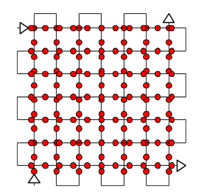
Circular orbit: Fly circular orbits around the object at different altitudes and with varying camera pitch angle to capture the scene from as many viewpoints as possible.
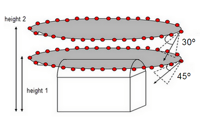
Helix pattern. Flying around the structure along a helical path produces good results for 3D reconstruction, e.g. for telecommunications towers.
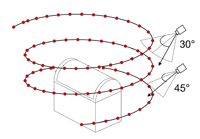
Tips: Avoid capturing the sky in the images as much as possible, as the strong contrast with the background can introduce artifacts. This can be mitigated by limiting upward-looking images.
PIX4Dcatch projects
For more information on how to capture images using PIX4Dcatch, refer to this article: Using PIX4Dcatch to generate a Gaussian Splat model.