
To effectively use a PIX4D-supported RTK device with a mobile device, the initial step is configuring the setup correctly. This involves setting the camera offset between the antenna and the mobile device's camera. This offset, whether measured automatically by Pix4Dcatch (SPC+) or manually by the user, is crucial for accurately computing locations captured by Pix4D-adapted RTK devices, ensuring precise measurements for scans or ground control points (GCPs).
目次
Mount the PIX4D-adapted Emlid RTK rover to the Device
Smartphone model
Devices with a Known Camera Offset
Camera Offset Measurements
How to Manually Measure the Camera Offset
Measure the X axis
Measure the Y axis
Measure the Z axis
Enter the Camera Offset Values
注: 最適なパフォーマンスを確保し 、問題の発生を防ぐため 、ご使用前にRTKアンテナのファームウェアを更新してください。更新手順については、『Emlid Reach RX ファームウェア更新ガイド』に記載されている指示に従って更新を行ってください。
Emlid Reach RXは、2024年4月30日にリリースされたバージョン2.0.0PIX4Dcatch 、PIX4Dcatch に完全に統合されています。
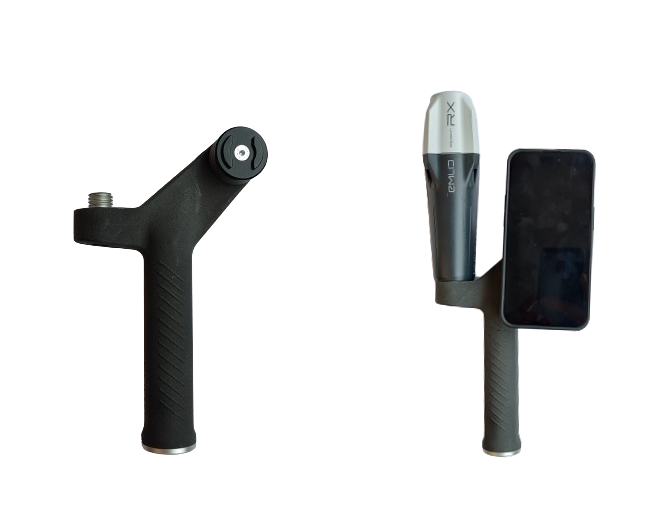
Mount the PIX4D-supported Emlid RTK rover to the device
PIX4DEmlidは、PIX4Dcatch モバイルデバイスで撮影した画像PIX4Dcatch センチメートル単位の精度PIX4Dcatch するGNSS RTK受信機です。PIX4D RTKローバーは、SP Connectが提供するSPコネクタ(ケースまたはクランプ)を使用して、スマートフォン(iOS)と接続することができます。
スマートフォンの機種
まず、お使いのスマートフォンを対応するSP-connectケースにセットします。次に、SP-connectケースに同梱されている説明書に従って、ケースをデバイスに取り付けてください。
Devices with a Known Camera Offset
This list contains the combinations of mobile devices (phones and tablets) with the Pix4D-supported RTK devices where the camera offsets are already measured. PIX4Dcatch will automatically fill in the X, Y, Z fields with the correct camera offset values.
| スマートフォンの機種 | 互換性 |
| iPhone | SPC+ |
|
iPhone 17 Pro iPhone 17 Pro Max |
✅ ✅ |
|
iPhone 16 Pro iPhone 16 Pro Max |
✅ ✅ |
|
iPhone 15 Pro iPhone 15 Pro Max |
✅ ✅ |
|
iPhone 14 Pro iPhone 14 Pro Max |
✅ ✅ |
|
iPhone 13 Pro iPhone 13 Pro Max |
✅ ✅ |
|
iPhone 12 Pro iPhone 12 Pro Max |
✅ ✅ |
|
iPhone 11 Pro iPhone 11 Pro Max |
✅ ✅ |
| iPhone XR | ✅ |
| Tablet model | 互換性 |
| iPad | SPC+ |
| iPad 11 inch M4-2024 | iPad case - Pix4D Japan* |
*日本国内でのみご利用いただけます。
注:iPad Pro 11インチ向けのソリューションは、日本でのみご利用いただけます。
カメラのオフセット測定
PIX4Dへの接続を開始すると、「RTKデバイス設定」ダイアログが開きます。「カメラオフセット」セクションでは、X、Y、Zのオフセット値を適切に設定できます。利用可能なオプションは、PIX4D RTKデバイスのバージョン、モバイルデバイス、およびデバイスケースの組み合わせによって異なります。以下のオプションが利用可能です: SPC+ およびカスタム。
「SPC+」オプションは、PIX4D RTKデバイスのバージョン、モバイルデバイス、およびデバイスケースの組み合わせが判明している場合にのみ利用可能です。「カスタム」オプションは常に利用可能で、汎用的なケースや特定のケースでの使用を想定しています。このオプションを使用するには、カメラオフセットを手動で測定し、PIX4Dcatch設定する必要があります。選択したカメラオフセット値は次回の測定時に保存されるため、設定が変更された場合のみ修正が必要となります。
-2.png?width=300&height=600&name=Plantilla%20Iphone%20(22)-2.png)
カメラのオフセットを手動で測定する方法
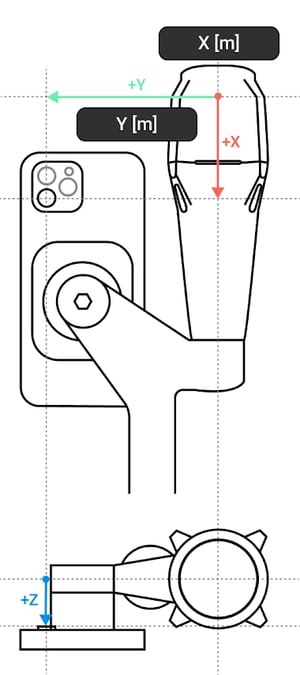
適切なSP-connectケースを使用して、本機をPIX4Dデバイスに取り付けてください。スマホケースはSP-connectのウェブサイトから別途購入できます。対応するモデルがない場合は、SP-connectのユニバーサルスマホマウントをご利用いただけます。SP-connectのケースは、ほとんどの自転車店やバイクショップでも取り扱っています。
Place the device in landscape mode and the display to the front. Notate the orientation of the X, Y, and Z axes and how they relate to the point of origin on the antenna to measure from. The point of origin resides in the middle of the screw mount at the base of the antenna. It will also be necessary to determine which lens to measure from for devices with multiple camera lenses.
X軸とY軸を測定する
X軸のオフセットを測定するには、アンテナの中央からY軸と交差する点までの垂直方向の距離を測定します。次に、カメラのレンズからマウントの下端までの距離を測定します。

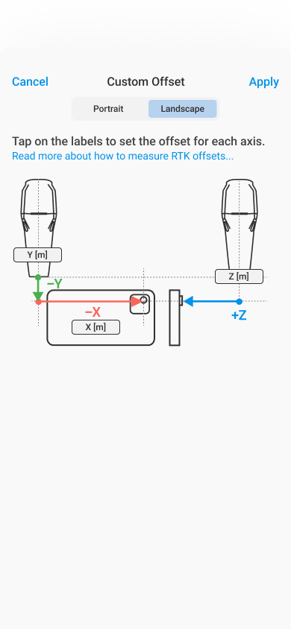
Z軸を測定する
Z軸のオフセットを測定するには、ハンドルの中心からレンズの中心までの深さを測ってください。
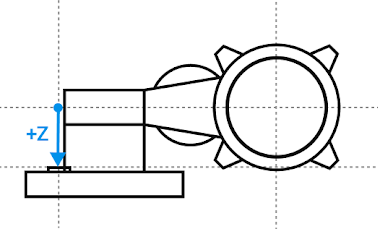
カメラのオフセット値を入力してください
カメラのオフセットを正確に測定して記録したら、それらを適切な「カメラオフセット値」フィールド に入力できます。デバイスの地域設定に応じて、表示される単位はセンチメートルまたはインチになります。
-1.png?width=300&height=600&name=Plantilla%20Iphone%20(23)-1.png)
-1.png?width=300&height=600&name=Plantilla%20Iphone%20(24)-1.png)
The camera offset is now properly set in the Camera Offset Values X, Y, Z fields. Continue with the RTK Device Settings dialog to complete the Pix4D-supported Emlid RTK connection to the device.