
IN THIS ARTICLE:
How to change the password
I forgot my password / Password reset
How to change the password
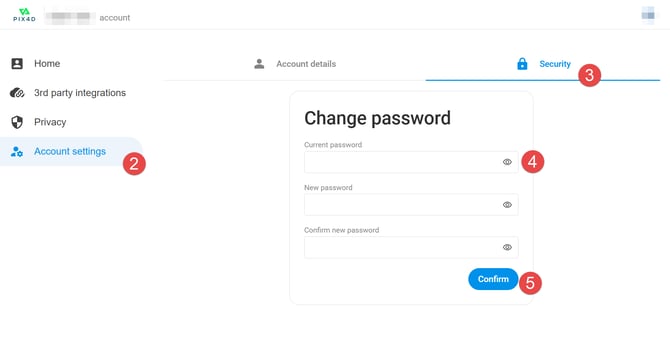
- Open your Pix4D account page and log in with your Pix4D account.
- On the left sidebar, click Account settings.
- Click the Security tab
- Fill in the Current password, New password, and Confirm new password.
- Click Confirm.
The new password is saved and can be used at the next login.
I forgot my password / Password reset
How to request a password reset
- Go to your Pix4D account page.
- Enter the email associated with the account. Click Continue.
- In the password dialog, click Forgot password?.
- A link to reset the password will be sent to the email address associated with the account.
If the password reset email is not received
Note: In most cases, password reset emails are sent immediately. If the email is not received, it is recommended to wait up to one hour. If the password reset email is still not received after one hour, proceed with the following steps:
Make sure to provide the right email address for an existing Pix4D account.
If the email address used is valid, another issue may prevent our email from being received.
- Noreply email: Some businesses are automatically blocking all messages coming from "norepy" email. Our messages are sent by noreply@pix4d.com. Ensure with your IT system administrator that an exception for noreply@pix4d.com is created. After that, click on Resend email.
- Filters: Ensure no filter is preventing our emails from appearing in your inbox. If using Gmail, filters can be accessed from this link (external link).
- Spam: Ensure that the message is not in the Spam / undesired / junk folder.
Tip: A global search can be performed for the entire inbox (all folders) by searching for noreply@pix4d.com the sender.
Tip: Also search for an email using the subject line. The subject will be different depending on the language selected during the account creation:
- English:
Password reset for Pix4D - French:
Réinitialisation du mot de passe pour Pix4D - German:
Passwort zurücksetzen für Pix4D - Japanese:
Pix4D用パスワードリセット - Italian:
Ripristino della password per Pix4D - Spanish:
Restablecer contraseña para Pix4D - Portuguese:
Reinicialização de senha para Pix4D