
How NTRIP works
To achieve centimeter-level accuracy, a base station at a known position follows a three-step process to send real-time corrections to a rover. First, the base station continuously monitors satellite signals. Second, it calculates the precise error by comparing its known location to the position derived from the satellite signals. Finally, it streams this correction data to the rover every second.
NTRIP Architecture
The NTRIP system consists of three primary components:
- The NTRIP caster: an HTTP Internet service, acting as a line of communication between the NTRIP server and NTRIP clients.
- The NTRIP server base station: transfers the data corrections from the NTRIP server base station to the NTRIP caster.
- The NTRIP client rover: the end-user device that receives correction data to perform Real-Time Kinematic (RTK) positioning via NTRIP reference stations.
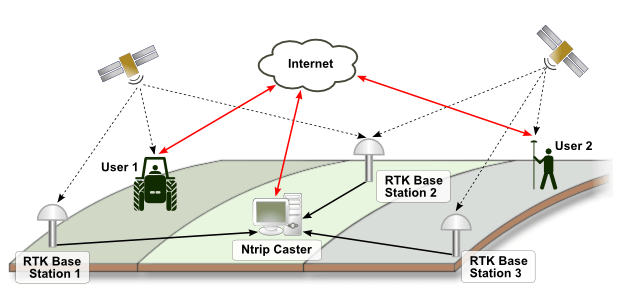
NTRIP Service
To gain access to an NTRIP service, sign up for an NTRIP subscription with a provider. An NTRIP subscription service should include an IP address, a port number, a username, and a password for accessing the network service. These credentials will be used to connect the rover to the NTRIP network and receive corrections. The cost and coverage area depend on the specific service provider.
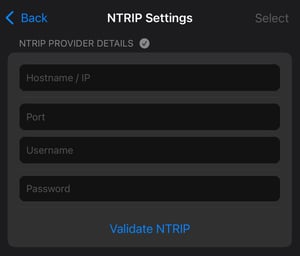
When entering the NTRIP credentials:
- Check the website of the NTRIP provider to find out which mountpoint is more suitable.
- Use the nearest reference station in the work area. In most cases, the nearest reference station is detected automatically.
- Reach out to the NTRIP provider for information on coordinate systems in which the NTRIP provider broadcasts their corrections. This is the coordinate system, for example, that needs to be selected as an Input coordinate reference system when using PIX4Dcatch with a supported RTK device.
Internet connectivity
The supported RTK device gets its corrections through the mobile device’s internet connection. If the connection drops, the corrections stop and positioning accuracy falls from centimeters back to meters.
When an internet connection is needed
- During data capture: Stay connected to the NTRIP service for the whole capture.
- When PIX4Dcatch starts: To log in to the app.
- For coordinate reference system transformations
- After capture: To upload the project to PIX4Dcloud or to transfer it for processing.
Connection options
- Mobile data (4G/5G): Use a device with an active data plan and good coverage in the work area.
- Personal hotspot: Wi-Fi-only iPad or tablet can connect through a phone’s hotspot or a mobile router. Keep the hotspot device close by, and make sure it does not go to sleep during the capture.
- Wi-Fi: Works only when the whole capture area is within Wi-Fi range.
Before going to the field
- Check the mobile coverage map for the project site. Remote areas, valleys, tunnels and dense urban canyons may have weak or no signal.
- Make sure the data plan is active.
- On corporate or public networks, check that the NTRIP port (often 2101) is not blocked by a firewall, or proxy server.
During capture
- Wait for RTK Fixed before capturing, and keep an eye on the RTK status in the Connection Card.
- If the status drops to RTK Float, DGNSS Only or Autonomous GNSS fix under open sky, a likely cause is a lost internet connection or a dropped NTRIP stream. Check the connection, then wait for RTK Fixed again before continuing.
- Avoid capturing in areas with weak or unstable connectivity. Any part captured without corrections will have lower accuracy.
Important:
-
Capturing without an internet connection is possible. However, RTK corrections will be unavailalbe and the images will only have the accuracy of standard GNSS positioning.
- PPK (Post-Processed Kinematic) is not supported in PIX4Dcatch. RTK corrections must come in real time through an NTRIP service while capturing. A stable internet connection is required.