
目次
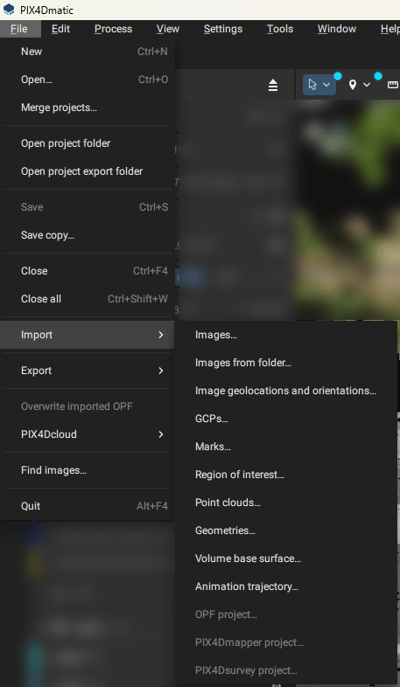
Images
Image geolocation and orientation
Region of interest (ROI)
Ground Control Points (GCPs) file
Marks file
Geometries
Volume base surface
Processing templates
Point cloud
OPF project
PIX4Dmapper project
PIX4Dsurvey project
Animation trajectory
画像
PIX4Dmatic is based on image processing using JPEG or TIFF formats.
| Extension | 説明 |
| .jpg, .JPG, .jpeg, .JPEG | JPEG images |
|
.tiff, .TIFF, .tif, .TIF |
TIFF images and depth maps |
For more information about the supported cameras see: Which cameras are supported in PIX4Dmatic.
Important: PIX4Dmatic cannot process multispectral or thermal imagery. Only RGB images are currently supported.
Image geolocation and orientation
The import of image geolocation and orientation is useful when the values are not available in the EXIF/Xmp tags or when using PPK workflows.
| Extension | 説明 |
| .csv, .txt | A text file containing seven or nine columns per line and a comma (,) to separate the values
|
For more information: How to import and export image geolocation and orientation files - PIX4Dmatic
imagename, coordinate1 (decimal degrees), coordinate2 (decimal degrees), z (meter), yaw (decimal degrees), pitch (decimal degrees), roll (decimal degrees)
IMG_3165.JPG,46.2345612,6.5611445,539.931,38.6,3.5,8.3
IMG_3166.JPG,46.2323423,6.5623423,529.823,44.1,3.4,5.4
関心領域(ROI)
PIX4Dmatic allows importing a defined area using .kml files, ensuring precise geographic coordinates for improved alignment and reconstruction of 3D models.
| Extension | 説明 |
| .kml | A standard format file for storing geographic data, often used for representing points, lines, polygons, and other features in photogrammetry applications. |
Note: The file should contain only a single geometry.
Ground Control Points (GCPs) file
Ground Control Points (GCPs) are used for precisely georeferencing the project.
| Extension | 説明 |
| .csv, .txt | A text file containing four or six columns per line and a comma (,) to separate the values.
|
For more information and all formats please see the GCPs import format article.
label, X(units), Y(units),z (units), Accuracy Horz (units), Accuracy Vert (units
GCP0,2532795.105,1152094.639,395.883,0.02,0.02
GCP1,2532728.805,1152079.825,396.619,0.02,0.02
Marks file
Marks can be imported if they were previously marked and exported in a PIX4Dmapper or PIX4Dmatic project.
| Extension | 説明 |
| .csv, .txt |
A text file containing positions of marks on individual images.
|
For more information please see the How to import GCP marks from PIX4Dmapper into PIX4Dmatic article.
Geometries files
Geometries can be imported into PIX4Dmatic if they are exported as vector files. The following conditions must be met:
Project CRS Requirement:
- The option to import vector files becomes available only if the project's Coordinate Reference System (CRS) is set.
- The files must include a valid CRS (e.g., an accompanying .prj file) from which a WKT can be extracted.
- All imported files must share the same CRS.
| Extension |
説明 | |
| DXF files | .dxf | Vector file formats are used to store geometric and spatial data, with DXF primarily for CAD designs, SHP for GIS-based mapping and attributes, GeoJSON for lightweight, web-friendly geospatial data, and pointfile as .csv, .txt, and .xyz. |
| Shapefiles | .shp, .zip, .shz | |
| GeoJSON files | .geojson, .json | |
| CSV files | .csv | |
| TXT files | .txt | |
| XYZ files | .xyz | |
Note: Imported layer colors may not be fully preserved. It is recommended to adjust layer colors after importing them.
Volume base surface
Volume base surface can be imported as LandXML for volume computation.
Processing templates
Custom processing templates can be imported if they were previously saved and exported from a PIX4Dmatic project.
| Extension | 説明 |
| .json | A file containing a custom processing template including the Title and a Description (Optional) |
For more information: Custom processing templates - PIX4Dmatic
点群
Point clouds can be imported into PIX4Dmatic from various sources, including aerial surveys, terrestrial laser scanning, and photogrammetry.
When importing point clouds, it is essential to ensure that the file format is compatible with PIX4Dmatic. The supported formats are .las and .laz.
| Acquisition type | |
| Unestructured | Normals cannot be computed for point clouds. Mesh generation will not be possible. |
| ナディール | Normals will be calculated assuming the laser scan was captured from above. |
| Static | The scanner is assumed to be positioned at the origin of the point cloud's local coordinate system. |
| With trajectory | Trajectory file can be imported together with the point cloud. To use the trajectory option, the point cloud must include a GPS time attribute. |
For more information: Import point cloud - PIX4Dmatic
OPF project
For more information: Importing and Exporting OPF - PIX4Dmatic
PIX4Dmapper project
PIX4Dmapper 4.x projects can be imported into PIX4Dmatic since version 1.78.0. Supported imports include projects captured with standard cameras, along with their calibration and dense point cloud data.
The following are not currently supported: projects using a combination of arbitrary vertical and recognized horizontal coordinate reference systems for the output, and projects with a defined non-zero geoid height above the ellipsoid.
PIX4Dsurvey project
PIX4Dsurvey projects can be imported into PIX4Dmatic 2.X by dragging and dropping the .p4s file onto the home page.アニメーションの軌跡
Animation trajectory can be imported into your project to create a video, keeping the same path and all the views created along the trajectory