
Create a new dataset to start processing imagery and create maps and digital twins of the reality or upload outputs to PIX4Dcloud.
ライセンス:この記事は、PIX4Dcloud およびPIX4Dcloud (旧PIX4Dcloud )のライセンスに適用されます。
権限:PIX4Dcloud では、オーナー、マネージャー、およびエディターのみがデータセットの作成および編集を行うことができます。
| 1.Dataset creation > | 2. Image selection > | 3.Output coordinate system > | 4.Processing options > | 5. GCPs automation |
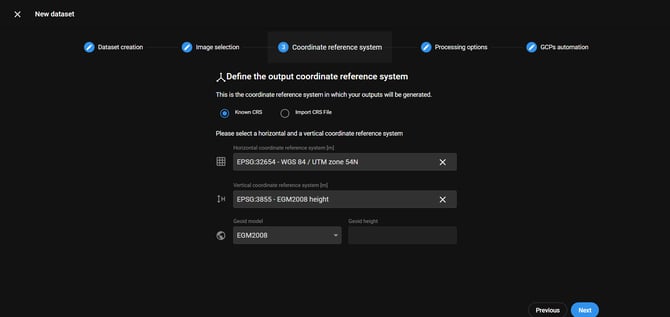
- PIX4Dcloud always offer a default output coordinate system based on the location of the input images.
- If the output coordinaPIXte system is known and it is supported in the database, select Known CRS. Then, define the horizontal, vertical coordinate system, and geoid/or geoid height in case of not geoid.
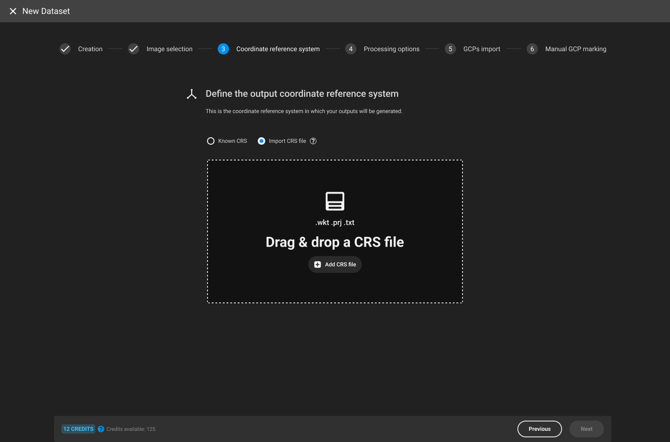
- To define a custom CRS:
- Select Import CRS file: Drag and drop a CRS file (.wkt, .prj, or .txt) defining the coordinate system.
- WKT2 files coming from site localization are supported.
Horizontal output coordinate system
Select the horizontal coordinate system for the project outputs:
- Search for the name of the coordinate system or EPSG code. Only a projected coordinate system is listed.
- WGS84 / UTM Zone XX : The UTM zone is computed based on the image EXIF information.
For more information: Georeferencing of datasets, outputs and annotations on PIX4Dcloud
Warning: If a project is processed with GCPs, the selected horizontal system has to match the coordinate system in which the GCPs have been measured.
Vertical output coordinate system
Selecting the vertical coordinate system, the geoid model, and the geoid height is possible.
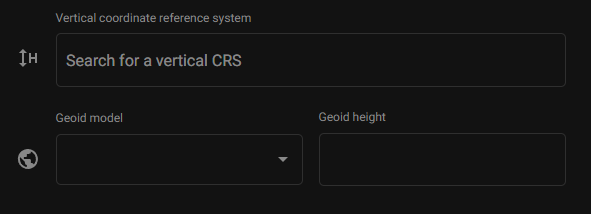
Geoid model: Several geoid models are available in the PIX4Dcloud. By default, EGM 2008 is applied.
Geoid height: When the geoid corresponding to the selected vertical reference frame is not available or doesn't exist, it is possible to specify the Geoid height value.
To select the vertical coordinate system:
- ~において 垂直座標系 dialog, search or copy-paste:
- The name or,
- 座標系のEPSGコード。
- According to the case, select also:
- Ellipsoidal height as vertical above the geoid, or
- Geoid model, or
- Geoid height.
- 次へをクリックしてください。
Note: Non-isometric coordinate reference system is not supported in PIX4Dcloud.