
目次
Possible causes of PIX4Dmatic crash during processing
Possible causes of PIX4Dmatic crash before processing or during application launch
Reading the log file
Possible causes of PIX4Dmatic crash during processing
- GPUドライバーが古くなっています。古いGPUドライバーはシステムの不安定な動作を引き起こす可能性があります。GPUドライバーを更新するには、NVIDIA Driver Lookup で、お使いのモデルに対応する最新のバージョンを確認してください。「ドライバーの更新方法」の手順に従ってください。
- RAMが不足しています。 大規模なプロジェクトを正常に処理するには、より多くのRAMが必要です。詳細については、以下をご参照ください: PIX4Dmatic ハードウェア または PIX4Dsurvey ハードウェア. 処理手順全体を通じて、ログファイル内にRAM使用率 [X%RAM] が表示されます。
[2023-08-07 15:34:45][97%CPU][34%RAM][Calibration sequence](Info) - Insufficient storage. Larger projects require more storage to process correctly. For more information review: PIX4Dmatic recommended hardware or PIX4Dsurvey recommended hardware.
- 外付けUSBストレージやネットワークドライブの使用。 外付けUSBストレージや ネットワークドライブの使用は 推奨されず、システムの不安定化やクラッシュの原因となる可能性があります。最高のパフォーマンスと安定性を確保するため、プロジェクトのイメージファイルと出力ファイルは、同じ内蔵ドライブに保存してください。
- 対応していないオペレーティングシステムです。 詳細については 、「PIX4Dmatic 要件」または「PIX4Dsurvey 要件」をご覧ください 。
- Antivirus application interference. If a 3rd party antivirus application is installed, ensure that it is not interfering with PIX4D by temporarily disabling the application. If that resolves the issue then check to see if the antivirus application has a program whitelist and add PIX4Dmapper to the list.
Possible causes of PIX4Dmatic crash before processing or during application launch
- Corrupted installation or Preview version. Ensure that the latest stable version is installed correctly. Uninstall PIX4Dmatic (How to completely uninstall PIX4Dmatic) or PIX4Dsurvey (How to completely uninstall PIX4Dsurvey) then download and install the latest stable version available. For more information: PIX4Dmatic Download or PIX4Dsurvey Download.
- GPUドライバーが古くなっています。古いGPU ドライバーは システムの不安定な動作を引き起こす可能性があります。GPUドライバーを更新するには、NVIDIA Driver Lookup で、お使いのモデルに対応する最新のバージョンを確認してください。
- 対応していないオペレーティングシステムです。 ダウンロードページで対応オペレーティングシステムをご確認ください 。詳細については、PIX4Dmatic ハードウェアまたはPIX4Dsurvey ハードウェアをご覧ください。
- Antivirus application interference. If a 3rd party antivirus application is installed, ensure that it is not interfering with PIX4Dmatic or PIX4Dsurvey by temporarily disabling the application. If that resolves the issue then check to see if the antivirus application has a program whitelist and add PIX4Dmatic or PIX4Dsurvey to the list.
これらの対処法で問題が解決しない場合は、以下の情報を添えてサポートまでご連絡ください。
- クラッシュ時の挙動の説明
- それはいつ起こるのですか?
- 別のパソコンでも同じ現象は起こりますか?
- 他のデータセットでも同じ現象は起こりますか?
- 再現可能ですか?
- プロジェクト情報
- 品質レポート(PIX4Dmaticのみ:
 レポートパネル >
  (エクスポート)
 - ログファイル(メニューの「ヘルプ」>「プロジェクトログをエクスポート...」)
- 画像数
- 品質レポート(PIX4Dmaticのみ:
-
- GPUのメーカーとモデル、および現在のドライバーのバージョン
- 搭載されているRAMの容量
- Quantity of Storage availableComputer information
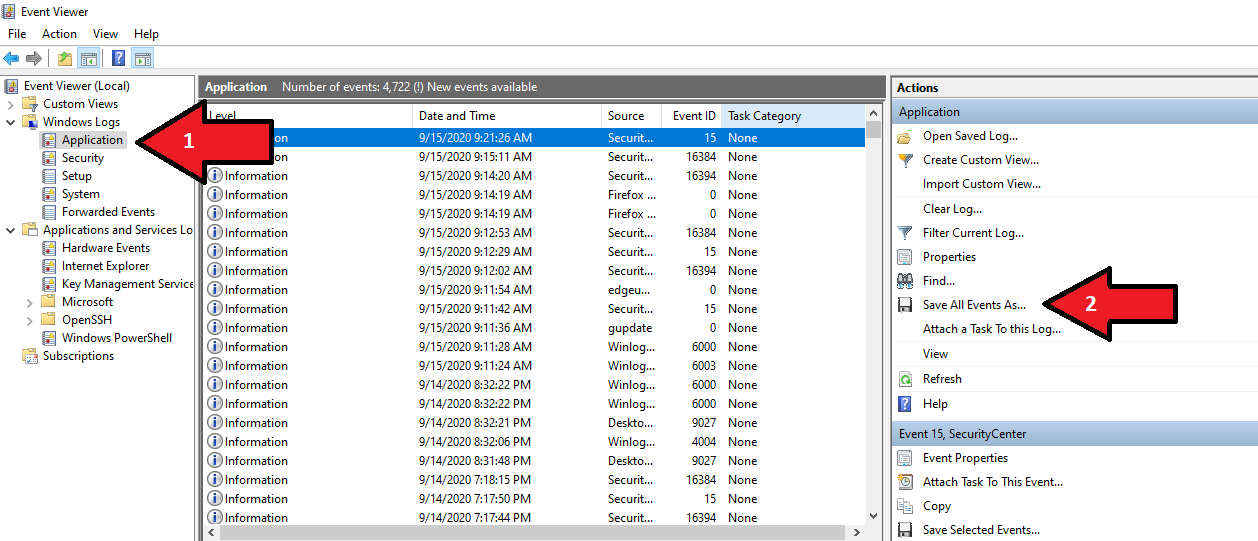
また、Windows イベント ログを提供していただけると参考になるかもしれません。このファイルを作成するには:
- PIX4Dmatic PIX4Dsurvey を起動します。
- 問題を引き起こす。
- Windowsの検索ボックスから、「Windowsイベント ビューアー」を開きます。
- 左側のパネルで、「Windows ログ」>「アプリケーション」を選択します。
- 右側のパネルで、「すべてのイベントを別名で保存...」をクリックします。
- ファイルを.evtxまたは.txt形式で保存してください。
ログファイルの読み取り
PIX4Dmatic generates one or multiple log files within the lifespan of a project. Log files are useful as they show information about the system or the processing steps.
How to export log files - PIX4Dmatic
Learning how to effectively read log files generated by PIX4Dmatic is very useful skill. Analyzing these logs enables users to troubleshoot issues, optimize processing parameters, and enhance the overall efficiency of the projects.
システム情報
ログファイルの冒頭にはシステム情報が表示されます。このセクションには、プロジェクトで使用PIX4Dmatic PIX4Dsurvey 、オペレーティングシステム、コンピュータのハードウェアなどの詳細が記載されています。
# PIX4Dmatic version: 1.62.0
# analyticsItpAutomarkingVersion version: 0.0.8
# autoGcpVersion version: 6.0.0
# calibrationVersion version: 15.0.0
# cameraCreationVersion version: 10.1.1
# cameraVersion version: 7.0.4
# densifyVersion version: 4.2.1
# dsmVersion version: 4.2.1
# image2bimLine3DVersion version: 3.0.0
# orthoVersion version: 8.0.0
# qrVersion version: 0.16.0
# sgmVersion version: 1.0.0-rc5
# skysegVersion version: 2.0.0
# srsVersion version: 5.10.0
# ID: cfeeac18-5832-42fb-95d0-306215b002e7
# Platform: Windows
# OS: Windows 11
# CPU: 12th Gen Intel(R) Core(TM) i7-12700H, cpus=1, threads=20
# RAM: 16GB
# GPU renderer: NVIDIA GeForce RTX 3050 Ti Laptop GPU/PCIe/SSE2
# GPU vendor: NVIDIA Corporation
# GL version: 4.1.0 NVIDIA 552.44
# Qt version: 6.7.0 (windows)
# Command Args: C:\Program Files\Pix4Dmatic\Pix4Dmatic.exe
ログエントリの種類
PIX4Dmatic PIX4Dsurvey では、5 種類のログエントリが使用PIX4Dsurvey :
- [情報] - 一般的な入力データまたは操作の詳細。
- [警告] - 潜在的な問題または重要度の低いアラート。
- [エラー] - 処理中に重大なエラーまたは障害が発生しました。
- [処理中] - 処理の進捗状況。
- [UI] - ユーザーインターフェースの操作とイベント。