
注:この 機能は、組織管理やチームのアクセス制御機能とは関係ありません。
仕組み
「設定の制限」機能を使用するには、以下の手順に従ってください:
- メインメニューを開いてください。
- 「設定」の「制限」をタップします。
-1.png?width=250&height=500&name=Plantilla%20Iphone%20(18)-1.png)
-
- 「NTRIP CRS」の選択を非表示にする: NTRIP設定で入力座標系を選択できないようにします。このフィールドは非表示になります。
-3.png?width=250&height=500&name=Plantilla%20Iphone%20(8)-3.png)
- RTKを使用しないブロックキャプチャ: GPSが選択されている場合、キャプチャ機能を無効にします。RTKが有効になるまで、キャプチャボタンは使用できません。
-1.png?width=250&height=500&name=Plantilla%20Iphone%20(9)-1.png)
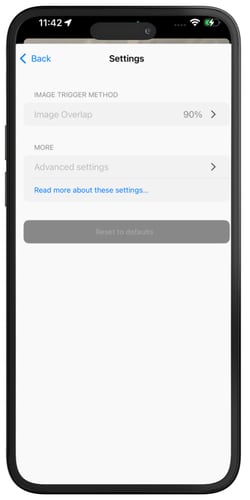
- ブロックキャプチャ設定: マネージャーは、プロジェクトの画像トリガー方法および詳細なキャプチャ設定を定義できます。その他のユーザーは、キャプチャ関連の設定を変更することはできません。
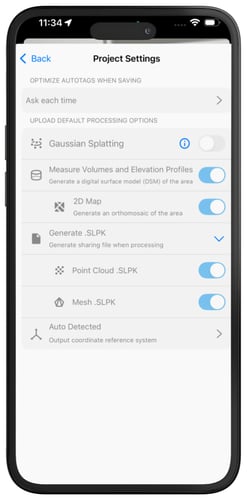
- プロジェクト設定をブロックする: 保存時のオートタグの最適化や、アップロード時のデフォルト処理オプションなど、プロジェクトレベルのオプションが変更されないようにします。
- 「NTRIP CRS」の選択を非表示にする: NTRIP設定で入力座標系を選択できないようにします。このフィールドは非表示になります。