
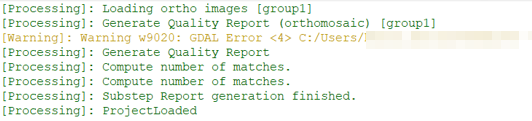
If Warning w9020 appears in the PIX4Dmapper log file, the key takeaway is that, in most cases, it can be safely ignored.
This warning is an internal message from the GDAL library (used for handling geographic data) that is often surfaced to the log. While it can look alarming, it is usually not an indicator of a failed process or poor quality.
IN THIS ARTICLE:
When to ignore it
Ignore this warning if:
-
Your processing (Steps 1, 2, or 3) completes successfully.
-
Your outputs (orthomosaics, DSMs, 3D textured mesh) look correct.
- The software does not crash.
In many ways, this is a "developer-level" message that is more helpful for debugging crashes than for standard users. We see these warnings in almost every project; they are a normal part of the software's background operations.
When to Investigate
The details of a w9020 error should only be reviewed if processing fails, the software crashes, or an export is missing. In those rare cases, the following three common causes should be checked:
-
Drive Type: Ensure you are not processing on a network drive, cloud-synced folder (OneDrive/Dropbox), or an external USB stick or Network Attached Storage (NAS). Always work from a local HDD or SSD.
-
Disk Space: Verify you have enough free space (usually 20–50 GB+, but depending on the project you might need more) on both your project drive and your system's "Temp" drive.
-
Missing Files: If the error says "No such file or directory," you may have manually moved or renamed folders within the project hierarchy.