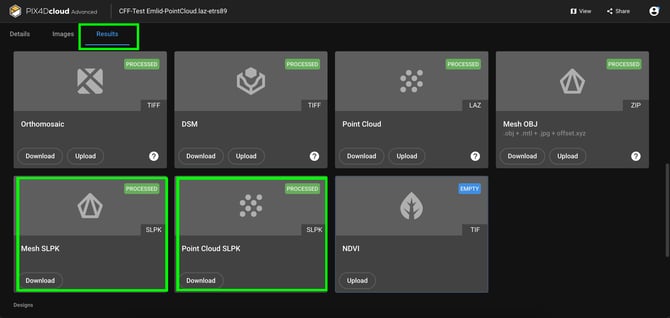
This PIX4Dcatch upload feature enables an Esri Scene Layer Package (SLPK) to be generated when uploading to PIX4Dcloud. An SLPK is a web optimized 3D file format that efficiently stores and streams large datasets such as textured meshes or point clouds for seamless visualization in ArcGIS Online and ArcGIS Pro.
When processing, the feature generates two files: a point cloud .SLPK and a mesh .SLPK.
Important: Access to this feature is only available for users with a valid PIX4Dcloud Pro license.
How it works
- Capture a project or open an existing project in the Projects menu.
- Tap Upload.
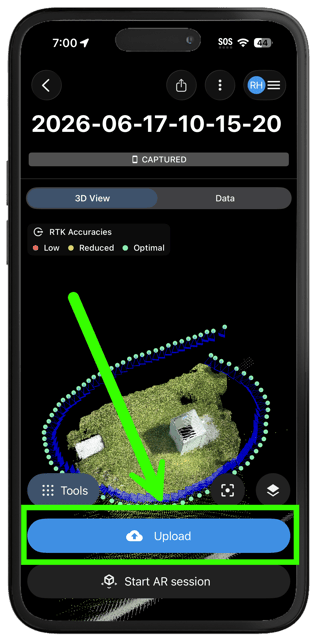
- Select the upload location and tap Next.
- Expand the Generate .SLPK option.
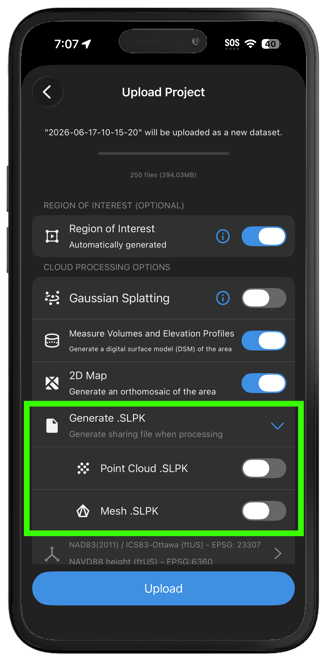
- Toggle the desired file type(s) and tap Upload.
- Open PIX4Dcloud.
- Go to Files & Reports and switch to the Results section to view the generated files.