
Error Description
When a PIX4Dmatic version 2.2 (or older) is already installed on a Windows computer, the installation of PIX4Dmatic version 2.3 (or newer) leads to a "Setup failed" error.
Solution
To solve this problem, it is necessary to first uninstall the older PIX4Dmatic version (2.2 or older) and then install the newer PIX4Dmatic version.
-
Uninstall PIX4Dmatic
-
In the Windows Search, type Add or remove programs.
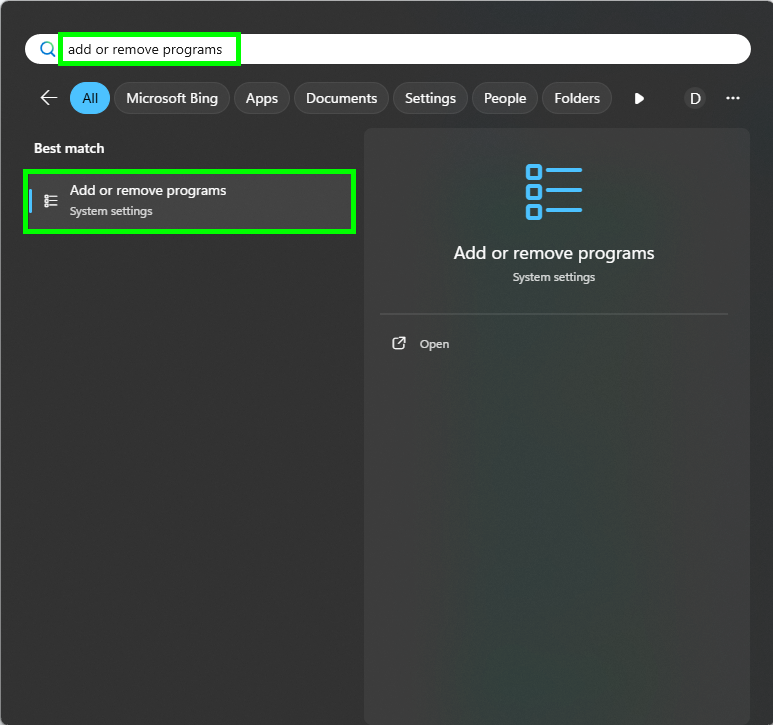
-
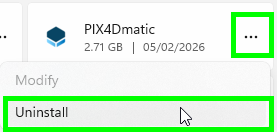
Scroll to find PIX4Dmatic and click the three dots and then uninstall.
- Click Uninstall.
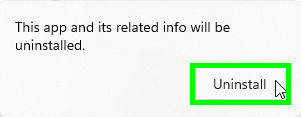
- If a pop-up appears asking Do you want to allow this app to make changes to your device? click Yes.
-
- Install PIX4Dmatic 2.3 (or newer) by double-clicking on the .exe file.
Info: If, after uninstalling PIX4Dmatic 2.2 (or older), you still get a Setup Failed error when installing PIX4Dmatic 2.3 (or newer), it might be necessary to completely uninstall PIX4Dmatic 2.2 (or older). You can find a step-by-step guide here: How to completely uninstall PIX4Dmatic (Windows).