
IN THIS ARTICLE
What is the issue?
What error message appears when this issue occurs?
Our recommendation and workaround
Note: PIX4Dmatic 2.1.0 resolves this issue by incorporating a dedicated fix.
We would like to inform you of a critical issue currently affecting Windows Explorer (the interface used to browse, open, or save files) when used within our Pix4D desktop applications: PIX4Dmatic, PIX4Dsurvey, PIX4Dfields, PIX4Dreact, and PIX4Dmapper.
This issue has been caused by an external company, Windows, and is therefore beyond our direct control. We have reported the issue to Microsoft.
Disclaimer: This link leads to an external website that is not affiliated with Pix4D. Responsibility for the content, security, and privacy policies of third-party sites lies solely with the respective owners
What is the issue?
This bug can cause our desktop applications to crash when interacting with Windows Explorer, particularly when opening or saving files. At this time, it appears to affect only customers who have Microsoft 365 installed.
What error message appears when this issue occurs?
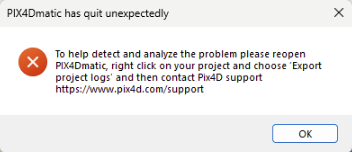
When the software crashes due to this bug, you may experience an unexpected shutdown of the application during file operations (such as opening, saving, or browsing for files) through Windows Explorer. In some cases, this will be accompanied by an error dialog, while in others, the application may simply close without warning and without saving your most recent changes.
-
PIX4Dmatic and PIX4Dsurvey display an error message.
-
PIX4Dmapper, PIX4Dfields, and PIX4Dreact close unexpectedly without showing an error
message
Our recommendation and workaround
Our development team is actively working to release a fix as soon as possible. In the meantime, we recommend temporarily uninstalling Microsoft 365 if feasible, and avoiding interacting with Windows explorer.
-
For PIX4Dmatic and PIX4Dsurvey, we also suggest using drag-and-drop for file operations within the application whenever possible, instead of relying on Windows Explorer dialogs.
-
For PIX4Dmapper, using drag-and-drop to add images will successfully create a new project; however, importing GCPs or marks may cause the software to crash.
-
For PIX4Dfields and PIX4Dreact, please contact Support, and select in the ticket creation for these solutions, the topic Processing error/Crash.