
This page summarizes how PIX4Dmatic 2.10.0 performs on three different machines:
-
Windows workstation: Intel(R) Core(TM) i9-14900K 3.20 GHz, 128 GB RAM, NVIDIA GeForce GTX 5080 (16GB RAM)
-
Mac Studio: 16-Core M4 Max CPU, 40 GPU cores, 128GB RAM
-
Mac mini: 8-Core M1 CPU, 8 GPU cores, 16 GB RAM
For more information related to the hardware recommendations, read the following article: Recommended hardware - PIX4Dmatic
Our goal is to understand whether the Mac Studio is a viable alternative to our current Windows setup for typical photogrammetry workflows, and where each platform has clear strengths or weaknesses.
Across the representative set of projects, the overall processing duration demonstrates that the Mac Studio is highly competitive against Windows, achieving equivalent and even slightly faster execution times on larger projects.
The project names in the charts identify the datasets used in the comparison. For example, M_360_ZenmuseP1_Tower refers to a dataset containing 360 images captured with a Zenmuse P1 camera. All datasets follow the same naming convention.
-1.png?width=670&height=415&name=Overall%20processing%20duration%20(Windows)-1.png)
However, when breaking down the workflow into individual steps, a more detailed picture of the performance emerges:
-
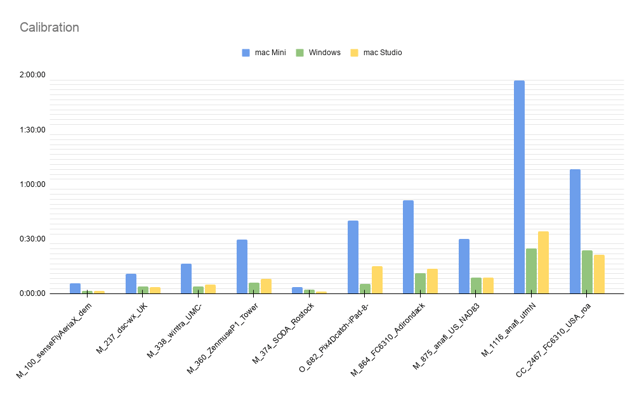
Calibration: The Windows workstation and Mac Studio complete calibration in less time than the Mac mini across the evaluated projects.
-
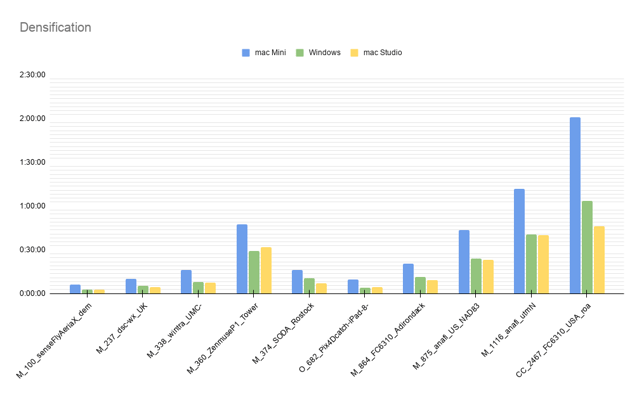
Densification: The Windows workstation and Mac Studio achieve similar densification processing times across the evaluated projects.
-
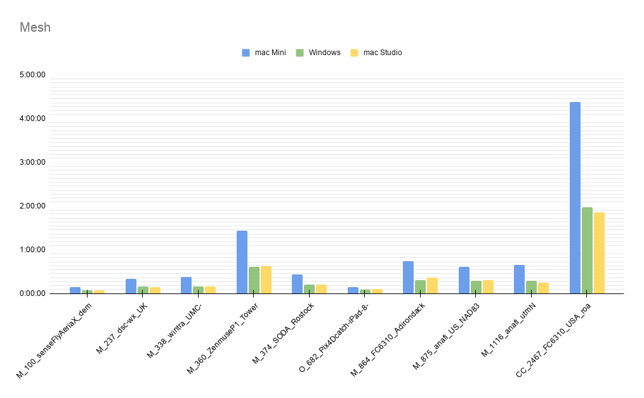
Mesh: The Windows workstation and Mac Studio achieve comparable mesh processing times across the evaluated projects.
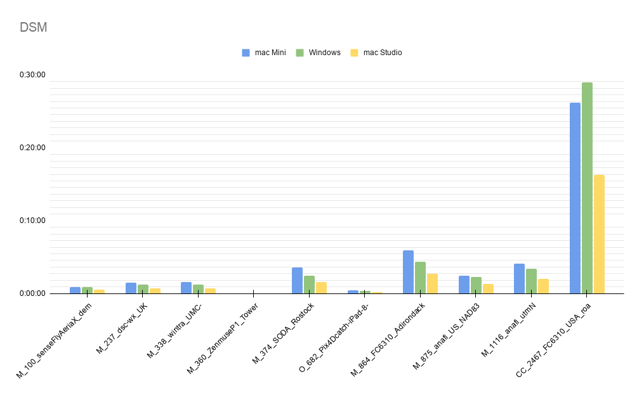
- Digital Surface Model (DSM): Mac Studio consistently completes DSM generation in less time than the Windows workstation across the evaluated projects.
-
Orthomosaic: Mac Studio also completes orthomosaic generation in less time than the Windows workstation across the evaluated projects
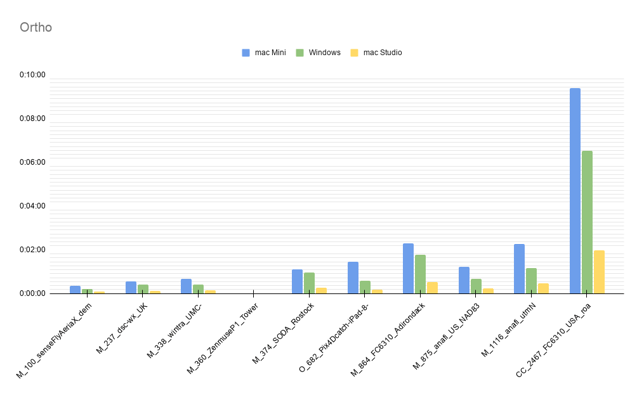
Mac mini: The tested configuration requires more time for each processing stage and for the overall workflow than the Windows workstation and Mac Studio. These results provide a reference for planning processing time on this configuration.
Overall, the Mac Studio and Windows workstation deliver comparable processing times for the evaluated workflows. The Mac Studio records shorter times for DSM and orthomosaic generation, while densification and mesh processing times are similar on both platforms. The Mac mini results illustrate how processing durations vary across hardware configurations and can help inform project scheduling.