
IN THIS ARTICLE
Problem
Know affected drones
Possible workarounds
Additional notes
Problem
Some DJI drones incorrectly record the camera yaw orientation in the image metadata, specifically in the tag: Xmp.drone-dji.GimbalYawDegree
This tag is expected to represent the direction the camera (gimbal) is pointing. However, in some datasets, the value is incorrect or inconsistent.
As a result, during calibration, the entire image block may be rotated away from the correct geographic orientation, even though the camera positions themselves appear correct.
Known affected drones
The issue has been observed in datasets captured with the following drones:
-
DJI Air 3
-
DJI Mavic 2 Pro
-
DJI Air 2S
- DJI Mavic 4 Pro
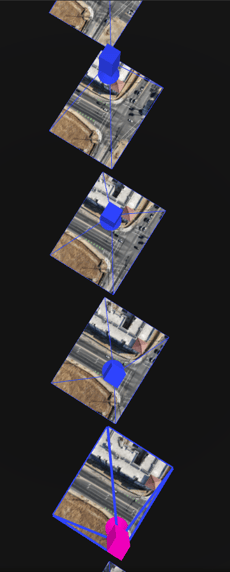
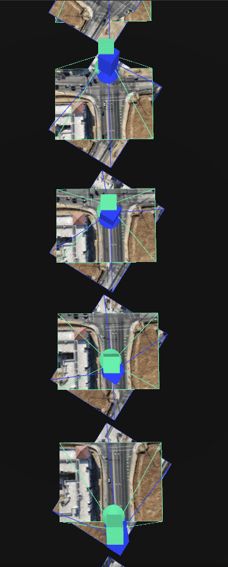
In these cases, the difference between the drone yaw and the gimbal yaw recorded in metadata can be very large (often 40–55° on average). Since the reconstruction relies on this metadata, the final model orientation may appear rotated by a similar angle.
 |
|
| In blue, the initial yaw position read from the image's metadata | In green expected yaw position of the images |
It is important to note that the issue originates from the drone metadata itself and, therefore, cannot always be corrected automatically during processing.
Possible workarounds
If a dataset produces a reconstruction with an incorrect orientation, the following workarounds may help.
a) Use the Standard calibration method (PIX4Dmatic and PIX4Dengine SDK only)
When available, use the Standard calibration pipeline (this calibration method is only available in PIX4Dmatic) instead of the Scalable Standard.
The Standard calibration method has the potential of using more image matches, so it may have more strength from them to correct the orientation when starting from inaccurate yaw values.
relies less heavily on the initial camera orientation, making it more robust when metadata orientation values are incorrect.
b) Remove the initial image orientations
Another workaround is to remove the initial orientations from the images before processing.
By removing the initial yaw values, the software estimates camera orientations solely from image matching, thereby preventing incorrect rotation caused by faulty metadata.
This workaround can be performed using:
- PIX4Dmatic or
- Another third-party software like ExifTool
c) Process only nadir images
If the dataset includes both nadir and oblique images, removing the oblique images may improve robustness.
Datasets that follow a regular grid flight pattern with only nadir images tend to calibrate more reliably when the initial orientation metadata is incorrect.
d) Avoid mixing multiple flight patterns
Datasets that combine grid flights, circular flights, and oblique imagery may be more sensitive to incorrect initial orientations.
If possible, process datasets captured with a consistent flight pattern.
Additional Notes
In theory, the yaw of the drone (FlightYawDegree) and the yaw of the gimbal (GimbalYawDegree) should be nearly identical during automated mapping missions, since the gimbal rarely rotates independently of the drone heading.
However, some drones appear to sometimes inaccurately record the gimbal yaw, which leads to the reconstruction issues described above.
Since the issue originates from the drone metadata, users experiencing this behavior are encouraged to report the issue to the drone manufacturer and include information such as:
-
Drone model
-
Firmware version
-
Flight logs
-
Sample images