

|

DTM |
|

|

|


✅Included: PIX4Dmatic Pro and PIX4Dmatic Analyst
❌Not included: PIX4Dmatic Standard
IN THIS ARTICLE
Input point cloud
Select filter
Grid type
Regular
Low-pass
Smart
Export
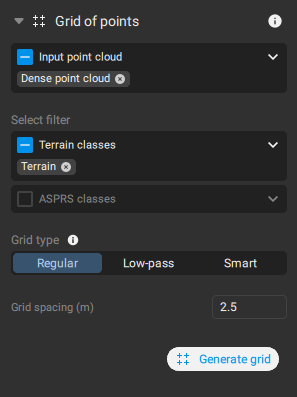
The Grid of Points tool generates a regularly spaced set of elevation points that represents the terrain surface. These points are used to reduce the complexity of the original point cloud and serve as the input for creating a TIN (Triangulated Irregular Network) in subsequent terrain-modeling steps.
Note: If a Region of Interest (ROI) is enabled before running Grid of points, the results will be processed within the Region of Interest (ROI). In case the grid of pointsneeds to be processed in the entire area, disable the Region of Interest (ROI).
Input point cloud
Defines the point clouds used for the Grid of points process:
- All: All point clouds in the Content > Point clouds are used for processing.
- Only visible - default. Only visible point clouds in the Content > Point clouds and Terrain classes are used for processing.
Select filter
- Terrain - default if Terrain points are available: All points in the Terrain class are used for processing. Only available after the Terrain classification is processed.
- Non-terrain: All points in the Non-terrain class are used for processing. Only available after the Terrain classification is processed.
- ASPRS classes. If the points are classified according to the ASPRS standard, it is possible to select the specific class for creating the grid points.
Grid type
Regular Grid of points
A regular grid is a simple rectangular grid that is decimated based on the selected Sample distance between points.
- Grid spacing [units]: Determines the grid size:
- 0.1 m - 30 m, 2.5 m - default.
- 0.3 ft - 100 ft, 8 ft - default.
Low-pass Grid of points
The low pass grid is generated based on the point cloud points within each cell based on the Grid spacing (sampling distance). Within the cell, the low pass looks at the vertical distribution and selects a point in the correct vertical slice.
- Grid spacing [units]: Determines the grid size:
- 0.1 m - 30 m, 2.5 m - default.
- 0.3 ft - 100 ft, 8 ft - default.
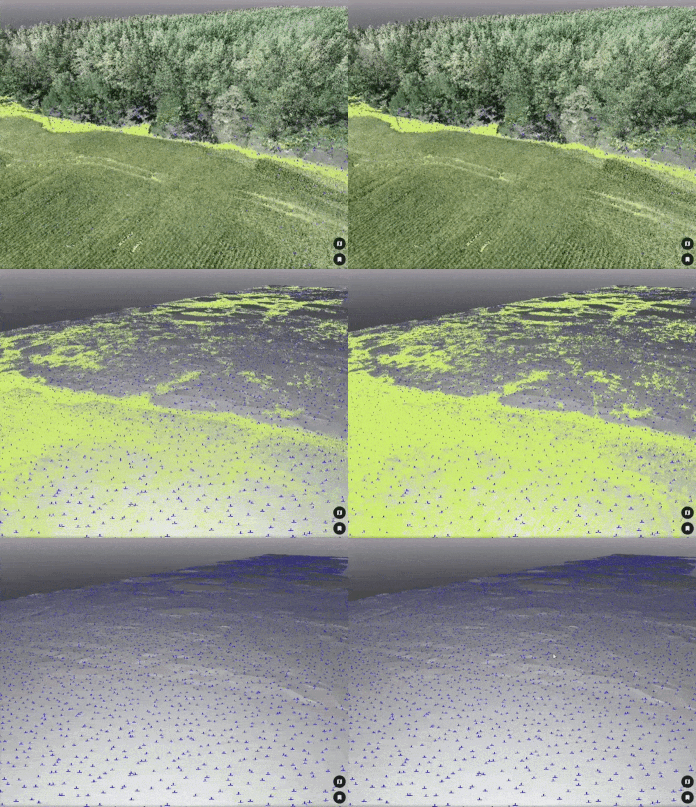
- Z-Range: Determines the altitude of the filter along the Z-axis.
- 0 - 10, 1 - default.
- Here’s what some example Z-Range values mean:
Value 0: Selects the absolute lowest point in each cell. This is highly sensitive to outliers, such as data errors or points in small ditches, and may not represent the true ground level.
Value 1 (Recommended for Terrain): Selects a point near the bottom of the elevation range but ignores the lowest 10% of points. This provides a much more stable and reliable estimate of the true ground surface by filtering out potential noise.
Value 5 (Median): Selects the point halfway up the vertical distribution of points in the cell. In an area with a bush, for example, this point would likely be located in the middle of the bush.
Value 9: Selects a point near the top of the elevation range, which is useful for modeling features like the top of a forest canopy.
Smart grid of points
A Smart grid attempts to generate just the most important points that define the terrain.
Based on the grid spacing, the number of grid points, and elevation variations the algorithm avoids creating redundant points on planar areas and focuses on generating points only where changes in terrain occur.
The following parameters can be adjusted:
- Minimum grid spacing [units]: The initial grid spacing that is used as a starting point for finding the most important points.
- 0.1 m - 30 m, 2.5 m - default.
- 0.3 ft - 100 ft, 8 ft - default.
- Z-Range: Determines the altitude of the filter along the Z.
- 0 - 10, 1 - default.
- Maximum number of grid points: The maximum possible number of grid points in the final result.
- 3 - 500000, 10000 - default
- Maximum elevation variation [units]: The maximum elevation variation from neighboring points.
- 0.01 m - 5 m, 0.05 m - default
- 0.03 ft - 16 ft, 0.15 ft - default
Export
The result of the Grid of points process can be exported in .dxf, .shp, .zip (.shp), geojson, .csv, .las, and .laz format.
More in the Export article.
If the .csv format is selected, it is possible to select among the following column formats:
| Format | Meaning |
| PENZD | Point name, Easting coordinate, Northing coordinate, Z coordinate, Description |
| PNEZD | Point name, Northing coordinate, Easthing coordinate, Z coordinate, Description |
| PXYZD | Point name, X coordinate, Y coordinate, Z coordinate, Description |
| PYXZD | Point name, Y coordinate, X coordinate, Z coordinate, Description |
| PENZL | Point name, Easting coordinate, Northing coordinate, Z coordinate, Label |
| PNEZL | Point name, Northing coordinate, Easthing coordinate, Z coordinate, Label |
| PXYZL | Point name, X coordinate, Y coordinate, Z coordinate, Label |
| PYXZL | Point name, Y coordinate, X coordinate, Z coordinate, Label |
| PENZ | Point name, Easting coordinate, Northing coordinate, Z coordinate |
| PNEZ | Point name, Northing coordinate, Easthing coordinate, Z coordinate |
| PXYZ | Point name, X coordinate, Y coordinate, Z coordinate |
| PYXZ | Point name, Y coordinate, X coordinate, Z coordinate |
| ENZ | Easting coordinate, Northing coordinate, Z coordinate |
| NEZ | Northing coordinate, Easthing coordinate, Z coordinate |
| XYZ | X coordinate, Y coordinate, Z coordinate |
| YXZ | Y coordinate, X coordinate, Z coordinate |
Use the  Include column headers checkbox to include the column headers to the columns in the .csv file.