
IN THIS ARTICLE
Supported licenses and requirements
Visualizing a site localization project
Site localization point details
Licenses: This article is only valid for PIX4Dcloud Pro licenses (formerly PIX4Dcloud Advanced).
Roles: Only Owners, Managers, Editors, and Readers can visualize datasets in PIX4Dcloud.
Supported licenses and requirements
Projects using Site Localization can be processed and visualized in PIX4Dcloud Pro (formerly PIX4Dcloud Advanced). These projects are typically uploaded from PIX4Dcatch using a custom coordinate system defined by the user.
Information: PIX4Dmatic and PIX4Dcloud support the use of site calibration files in WKT (Well-Known Text) format. However, these applications do not provide tools to create WKT files directly.
To obtain a WKT site calibration file, contact PIX4D Technical Support.
For more information, see: How to obtain a Site Localization file for PIX4Dmatic and PIX4Dcloud.
Visualizing a site localization project
Once the project has been processed, it can be opened in PIX4Dcloud. Compared to a standard project, the viewer includes additional elements related to Site Localization: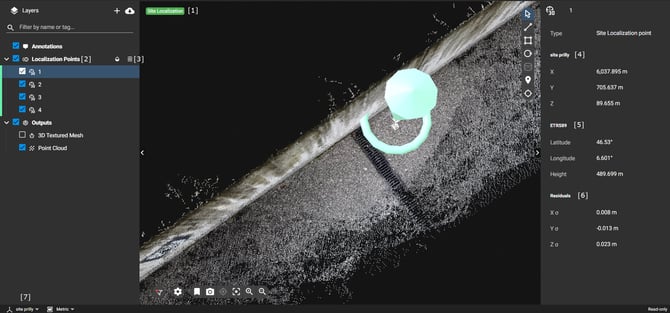
-
Site Localization tag [1]
Displays in the 2D/3D viewer, indicating that the project was processed using a custom coordinate system. -
Localization Points layer [2]
Contains all points used to compute the Site Localization transformation. -
Download WKT string file [3]
Allows downloading the file that defines the custom coordinate system. This file can be reused in PIX4Dmatic when processing additional projects.
Site localization point details
Selecting a Site Localization point displays the following information:
-
Local coordinates [4]
Coordinates expressed in the user-defined custom coordinate system. -
Global coordinates [5]
Coordinates of the same point in the global coordinate system used in PIX4Dcatch with a rover. -
Residuals [6]
Residual values of the transformation from the global coordinate system to the custom coordinate system at that point. -
Coordinate system switcher [7]
Displays the name of the active custom coordinate system.