
IN THIS ARTICLE
Integrated GPS sensor
GPS Status
PIX4D supported RTK device via Bluetooth
Header
Status
Accuracy
Integrated GPS sensor
When launching PIX4Dcatch, the application uses the mobile device’s built-in GPS. The signal quality is displayed in the Connection Card, located in the top-left corner of the capture screen.
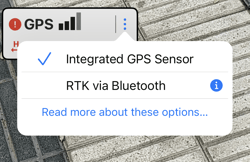
GPS Status
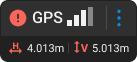
The connection card displays the quality of device reception.
The values:
-
 4 bars: Location accuracy less than 5m(16ft).
 3 bars: Location accuracy between 5m(16ft) and 10m(33ft).
 2 bars: Location accuracy between 10m(33ft) and 50m(164ft).
 1 bar: Location accuracy greater than 50m(164ft).
 No bars: No GPS signal.
RTK device via Bluetooth
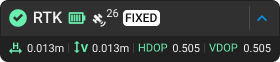
Header
- The header gives a quick overview of the RTK connection:
- RTK icon
.png?width=25&height=25&name=satellite%20(2).png) : The RTK icon indicates a successful connection to the RTK device.
: The RTK icon indicates a successful connection to the RTK device. - Satellite Count (26): A numerical value showing the number of satellites used in the connection (updates in real-time).
- Battery level
 :The battery status of the RTK device.
 - NTRIP RTK Status: Indicates the type of RTK NTRIP connection.
- RTK Fixed: Accuracy in the range of a few centimeters(in). This is the optimal status for the capture
- RTK Float: Accuracy in the range of 1m (3ft)
- DGNSS Only: Accuracy in the range of up to 10m (32ft)
- Autonomous GNSS fix: Accuracy in the range of more than 10m (32ft)
- No Fix: The data is not valid due to insufficient satellite coverage or internet connection issues.
- RTK icon
-
 The dropdown menu opens the RTK connection dialog.
- RTK vertical and horizontal accuracy estimations.
- Shows the expected accuracy based on the current signal.
- HDOP and VDOP (Horizontal/Vertical Dilution of Precision).
- Indicates the current quality of the position and distribution of the satellites.
Generally, the HDOP value is considered ideal when it is below 1. To achieve centimeter-level accuracy, it has been observed that the highest accuracy is achieved with a value below 0.65.
The VDOP value is considered ideal when it is below 1.5. To achieve centimeter-level accuracy, it has been observed that the highest accuracy is achieved with a value below 1.
Status
For optimal results, wait until the RTK status is Fixed before starting data capture. Monitor the status throughout acquisition, as it may fluctuate. If RTK Fixed is lost, move slowly to an area with better reception and avoid overhead obstructions. Once RTK Fixed is restored, PIX4Dcatch compensates for the period of reduced reception.
Accuracy
Indicates the expected positional accuracy for the current connection and RTK status. Once an RTK Fixed solution is established, both horizontal and vertical accuracy values should be within a few centimeters.
In ideal conditions:
- Horizontal Accuracy (H): Improves (the value decreases) as the RTK signal becomes more stable. This value should be within a few centimeters and, under ideal conditions, approach 0.01 m (0.03 ft).
- Vertical Accuracy (V): Improves (the value decreases) with RTK signal stability. This value should also be within a few centimeters and, under ideal conditions, approach 0.01 m (0.03 ft).
Accuracy values can vary and are influenced by several factors, including:
- Blocked and reflected GNSS signal, close to buildings, trees, and/or bridges.
- Rapid movements of the device.
- Poor cellular reception.
For best performance, keep the antenna upright during data acquisition.