
Important: Make sure to import the
non transparent (Without Transparency) GeoTIFF ("project_name_mosaic_group_name.tif") that Pid4Dmapper generates. For more information on how to generate this file:
Menu Process > Processing Options... > 3. DSM, Orthomosaic and Index > DSM and Orthomosaic.
In order to import the orthomosaic GeoTIFF file into 12D model:
1. Open 12D Model.
2. Create or open a 12D Model project.
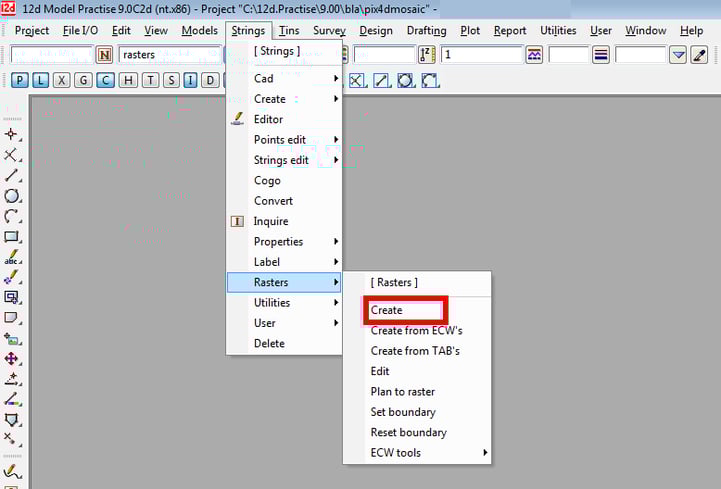
3. In the menu bar, go to Strings > Rasters > Create.
4. In the Create Raster Element window, select TIFF for the image format.
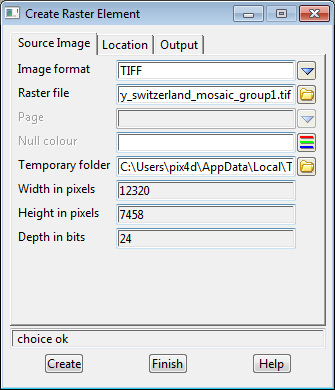
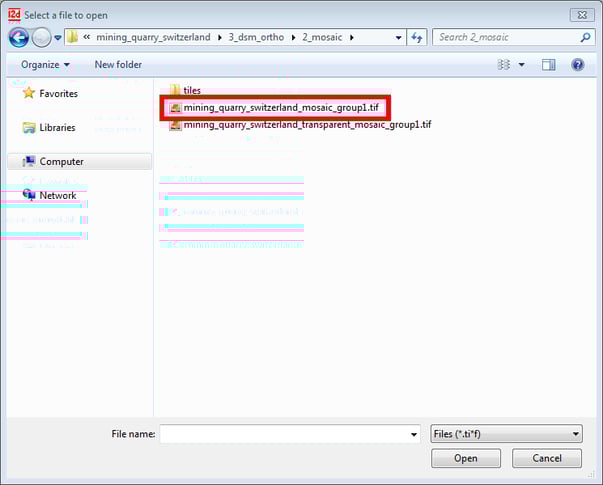
5. Browse to the location of the non transparent (Without Transparency) GeoTIFF file generated with Pix4Dmapper.
6. Click Create.
7. Click Finish.
8. (Optional) If the orthomosaic does not appear in the view, click on the layer icon in the tool menu and select "raster" and click Select.
免責事項:Pix4Dは、お客様へのサービスの一環としてこの情報を提供しています。Pix4Dは、このコンテンツの有効性または正確性について、明示的か黙示的かを問わず、いかなる保証もいたしません。